FTA announces Corporate Tax Registration Deadline – 90 days from Date of Incorporation/MOA. AED 10k penalty for late registration.
FTA announces Corporate Tax Registration Deadline – 90 days from Date of Incorporation/MOA. AED 10k penalty for late registration.
FTA announces Corporate Tax Registration Deadline – 90 days from Date of Incorporation/MOA. AED 10k penalty for late registration.

The Tax Registration Number (TRN) is a unique identification number assigned by the Federal Tax Authority (FTA) to all organisations registered in the UAE. It is mainly obtained during the VAT registration process, but it is also becoming increasingly relevant for Corporate Tax compliance and obtaining a Tax Residency Certificate.
If your TRN is not valid, your company cannot comply with tax regulations in the United Arab Emirates (UAE). However, a valid TRN will allow VAT-registered companies to charge VAT legally, claim input VAT, file tax returns, and prove VAT registration status as taxable persons.
If a company fails to register for VAT when it is legally obliged to do so, it will likely incur severe penalties issued by the FTA.

The first, and most important, step to registering for Value Added Tax (VAT) and receiving a Tax Registration Number (TRN) is determining whether you are required to do so as a result of mandatory requirements, or if you are choosing to register voluntarily.
1. Mandatory – Mandatory registration is required if your total taxable turnover exceeded AED 375,000 within the previous 12 months or is forecast to exceed AED 375,000 in the next 30 days. Thus, registration is required for VAT, and you will receive a TRN.
2. Voluntary – Voluntary registration is available to those whose total taxable turnover exceeds AED 187,500 within the previous 12 months or is expected to exceed AED 187,500 within the next 30 days. However, it is optional and only recommended if you wish to recover input VAT.
3. Non-Resident Businesses – If you operate a business in the UAE but do not have a physical presence in the country, you will need to register for VAT if you make any taxable supplies within the UAE, unless someone else is responsible for accounting for the VAT owed on the supplies. Therefore, in this case, registration is required regardless of your sales volume.
To accurately determine your registration eligibility for your business, it is strongly advised that you seek the assistance of a qualified firm such as Arabian Wingz, which specializes in assessing whether a business operates in the Designated Zones, exports products, or has a complicated supply chain.



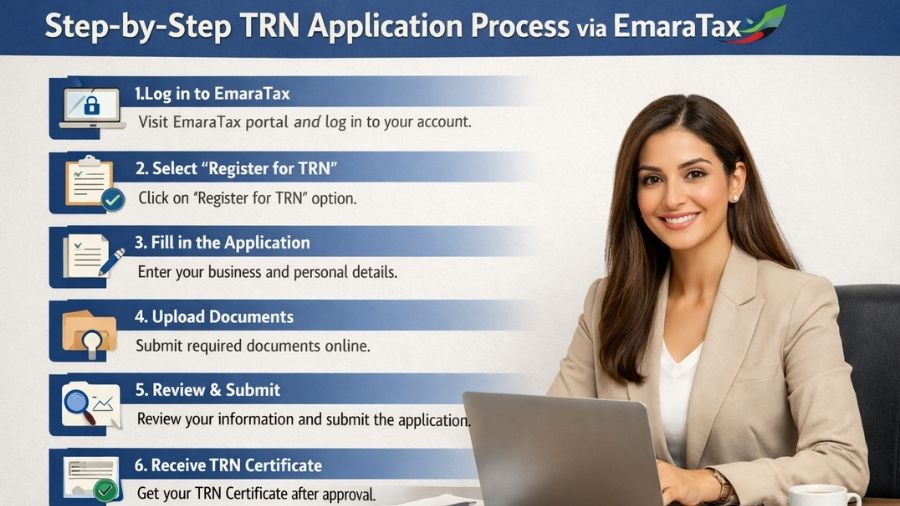
The complete application for a Tax Registration Number (for VAT objectives) is finished online through the Federal Tax Authority’s official e-services portal, EmaraTax.
1. Create an EmaraTax Account
Go to the FTA Website and click “Sign Up”, or you may use your UAE Pass on your mobile device for quick registration. Then enter your email address and mobile number, followed by a secure password. Lastly, check your email for the confirmation link sent to you, and click that link to activate your account.
2.Log In and Create a Taxable Person Profile
From there, you can see your Dashboard. On your dashboard, you will see the option of either creating your Taxable Person Profile or managing your current Tax Profile. Click on the “Create Taxable Person” option. You will need to enter the following in your Taxable Person profile –
3. Initiate the VAT Registration Application
4. Fill Out the Detailed VAT Registration Form
The application is divided into a number of different sections. Each section must be completed correctly to prevent delays with the TRN checking and approval process. The most important sections are –
5. Upload Required Documents
The FTA demands particular supporting documents to confirm your application. Confirm all files are clear, valid, and match the data you have entered. The FTA typically accepts PDF and DOC formats, with a maximum file size of 15 MB per document.
Mandatory Documents (for Legal Persons/Companies) –
6. Review and Submit
7. FTA Review and TRN Issuance

The Tax Registration Number is central to numerous tax and regulatory procedures in the UAE –
A. TRN for VAT Compliance
A business can’t legally charge VAT or claim Input VAT recovery without a valid TRN number. It should be quoted on –
B. TRN Check and Verification (Due Diligence)
It is a compulsory best approach for companies to conduct a TRN verification UAE before involving themselves in any taxable transaction with a new supplier. This controls fraudulent VAT collection and shields your privilege to claim input tax credit.
How to Verify a TRN –
C. TRN and the Tax Residency Certificate UAE
The Tax Registration Number (TRN) form is mostly related to Value-Added Tax (VAT) and Emirates Corporate Tax. The TRN is also commonly required for the Tax Residency Certificate (TRC) applications.
The tax residency certificate UAE is an official document issued by the Federal Tax Authority (FTA) that establishes that an individual or a company is a tax resident of the UAE during a specific period. The TRC has critical importance in the following areas –
(i) To take advantage of the UAE’s large network of Double Taxation Avoidance Agreements (DTAAs) with other nations.
(ii) To reduce or exempt withholding tax on income generated outside of the UAE.
Companies possessing a currently valid TRN and proof of VAT and Corporate Tax obligation fulfilment can substantiate the existence of operational substance in order to qualify for the TRC.

Even though the EmaraTax Portal was designed to be straightforward and easy to use, the process for obtaining a Tax Registration Number can be highly complicated due to the need for extreme precision when completing this application. It is common for the application to be rejected or delayed because of minor mistakes such as –
If you engage a qualified tax consultant such as Arabian Wingz, it can significantly speed up and help to guarantee your application.
Arabian Wingz provides the following –
By utilizing Arabian Wingz’s expertise, you will be establishing a solid, accurate foundation for your compliance process, thereby avoiding any late registration penalties and establishing your right to conduct taxable business legally in the UAE.
1. What is the tax registration number in UAE?
A Tax Registration Number (TRN) is a unique identification code issued to businesses and individuals for tax purposes by a country’s relevant tax authority. A tax registration number or TRN in UAE is a unique 15-digit number. This number is given by FTA, the Emirates’ tax authority, to businesses and individuals registered for VAT or corporate tax. This number is used for VAT-related activites, including filing returns and issuing tax invoices. TRN serves as the proof that a business or individual is officially registered for tax in the country.
2. How to check tax registration number?
You can check TRN through the official UAE FTA website. The tax authority provides a VAT TRN verification tool. You need to enter the 15-digit TRN and security code or captcha and click on Validate to confirm the registration status. Arabian Wingz can help you check TRN validity and confirm registration.
3. Is a VAT number the same as a tax ID?
In the UAE, the VAT number and TRN are the same. The TRN works as the tax ID and is used for VAT purposes. You need to use this number for filing VAT returns, issuing invoices, and formal communication with the FTA. So, VAT number and tax ID refer to the same unique 15-digit number.
4. Who needs to apply for a TRN in the UAE?
Businesses with annual taxable supplies exceeding the mandatory VAT limit, which is AED 375,000, need to apply for a TRN. However, companies below this limit but above AED 187,500 can opt for voluntary VAT registration. Foreign businesses need to register for VAT regardless of the threshold if they are making taxable supplies.
5. How long does it take to get a TRN in the UAE?
Getting a TRN in UAE usually takes between 5 and 20 working days. This timeline depends on how accurately documents are submitted. In case any error is made, the FTA requests additional documents. Once the registration application is certified, the TRN number is issued, and a VAT certificate is also provided.
6. When should a business apply for TRN in the UAE?
A business must apply for a TRN in UAE when it crosses the eligible mandatory VAT registration limit. Delaying registration when this limit is met can result in hefty penalties and serious legal issues. If the required threshold is expected to be met within 30 days, you should plan for VAT registration in advance. Arabian Wingz helps businesses with timely registration and assists them in maintaining VAT compliance.